

Rules
Accessibility standards for social platforms: defect log
Log social platform accessibility defects by WCAG 2.1 criterion, map them to US and Canadian duties, retest, and keep the evidence a platform entry needs.
What to take away
- An accessibility audit is only as useful as its defect log. Record each defect by WCAG 2.1 success criterion, page, browser and assistive technology.
- Give every defect an owner and a status, so a fix can be followed from report to retest.
- Retest with the same browser and screen reader that found the defect, then record the result.
- Keep test scripts, defect logs, user feedback and remediation dates as evidence for procurement, complaints and planning.
- WCAG 2.1 AA is the common working test, while ADA Title III and Canada's Accessible Canada Act decide which duty a defect touches.
One defect, one record
A defect record has to let an engineer reproduce the problem without asking a question. Name the page, browser, assistive technology and WCAG success criterion, attach a screenshot, and give the defect an owner and a status. Records written this way also support legal review and triage.
Field / What to write
- Page or flow
- Sign-up, profile, feed, search, help or ad tool
- Browser
- Name and version of a current browser
- Assistive technology
- NVDA, JAWS or VoiceOver, with the browser pair
- WCAG criterion
- The number and name, such as 2.4.7 Focus Visible
- Screenshot
- The state that shows the defect
- Owner
- The engineer or team who will fix it
- Status
- Open, fixed, retested or closed
Automated tools catch only part of the problem. Manual tests find focus order, reading order and control names, so the log should hold both kinds of finding. Recording each one against its numbered criterion lets engineers fix a defect and retest it the same way.
What the log maps to
The log also has to answer a legal question: which duty does a defect touch? In the US, ADA Title III applies to places of public accommodation.
The DOJ web accessibility guidance describes how businesses open to the public can make sure their websites are accessible to people with disabilities as the ADA requires.
Section 508 is a separate US law. According to the Section 508 federal agency rule, it applies only to federal agencies, so it reaches a private platform mainly through government contracts. The Revised Section 508 Standards at 36 CFR Part 1194 fold in WCAG 2.0 Level AA by reference.
In Canada, the Accessible Canada Act applies to entities under federal jurisdiction. That group includes Parliament, federal departments, Crown corporations, banks, telecom firms, broadcasters and transport providers. A social platform may fall in scope through broadcasting or telecom links, or it may fall outside.
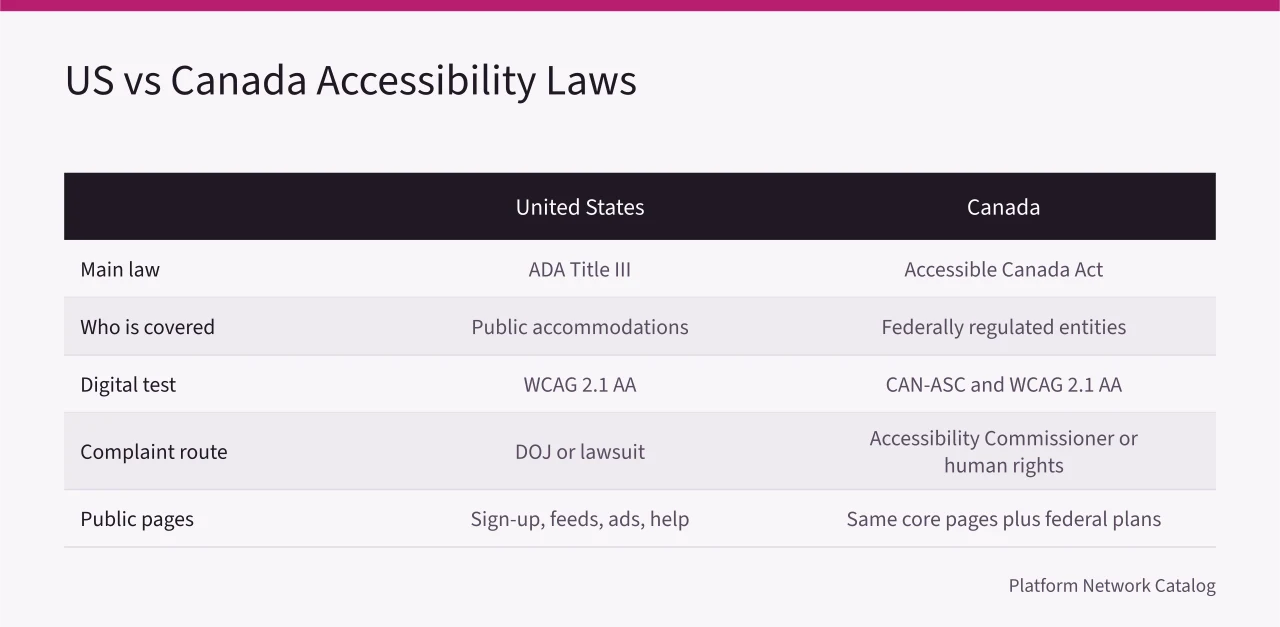
The Accessible Canada Act requires accessibility plans, feedback processes, progress reports and barrier removal, with the detail set out in the Accessible Canada Regulations. Provincial laws such as Ontario's AODA can add duties for provincially regulated operations.
A platform with users in both countries may need one audit plus separate legal mapping. The question of which platforms must comply is covered on its own page, and the user's side, including where to complain, sits in ADA compliance for social platforms.
The test pass behind each defect
Run the same checks on every public release, so defects are comparable from one release to the next. Each check names the criterion that a failure is logged against.
- Keyboard onlyTab, Shift+Tab, Enter, Space and Escape reach every control (2.1.1 Keyboard).
- Focus is visible (2.4.7 Focus Visible) and moves in a logical order (2.4.3 Focus Order), with no keyboard traps.
- Text, controls and icons have enough contrast (1.4.3 Contrast (Minimum), 1.4.11 Non-text Contrast).
- Axe, WAVE or Lighthouse has run on sign-up, profile, feed, search and ad flows.
- Video and live streams have captions and audio description (1.2.2, 1.2.4 and 1.2.5).
- Images, icons and charts have alt text or are marked decorative (1.1.1 Non-text Content).
- Forms have labels, error messages (3.3.1 Error Identification), time limits that can be adjusted (2.2.1 Timing Adjustable) and session recovery.
- NVDA, JAWS and VoiceOver on current browsers announce name, role and value for custom controls (4.1.2 Name, Role, Value).
- An accessibility statement and a feedback route are published.
Worked example: a comment feed
A comment feed on a platform like Reddit, Facebook or Instagram looks simple until you test it. The audit should check reply buttons, sort menus, emoji pickers, report links and load-more controls.
Auditing a Comment Feed
- Open the feed with keyboard only and log the first focus stop.
- Activate every button with Enter and Space.
- Test screen reader output for new comments and live updates.
- Check image alt text and video captions in replies.
- Retest after fixes with the same browser and screen reader.
Each failure becomes one record. A reply button that cannot be reached by keyboard, for example, is logged against 2.1.1 Keyboard, with the page, browser, assistive technology and screenshot. That record supports legal review and engineering triage.
Retest and keep it in the release
Retest with the original setup, so the result shows whether the fix worked and not whether the tester changed. Keep accessibility checks in the release process, since new features can reintroduce barriers. Accessibility fixes can also change layout, moderation and data flows.
Accessibility is a release condition, not a one time project.
Private chat is a separate product surface. When an audit extends to it, review the accessibility of the messaging experience, and browse messaging platforms such as WhatsApp, Facebook Messenger and Telegram as a separate category.
Evidence to keep
Before testing, define the audit boundary: the public surfaces in scope, the browsers and assistive technologies, and the release being evaluated. Assign each defect an owner and a remediation status, then retest with the original setup.
Evidence matters. Keep VPATs or Accessibility Conformance Reports, test scripts, defect logs, user feedback and remediation dates. These records help in procurement, complaints and internal planning.
If you publish a platform directory, note for each platform whether it offers an accessibility statement or a conformance report, and date both the way you date its pricing or terms, so the entry can be re-checked. Users who meet a barrier have complaint routes of their own, and the log is what a platform team would answer from.
Common questions
What should a defect record contain?
The page or flow, browser, assistive technology, WCAG success criterion and a screenshot, plus an owner and a status. With those fields an engineer can reproduce the defect without asking, and the retest can repeat the same setup.
Does the ADA require WCAG 2.1 AA?
No single regulation names WCAG 2.1 AA for all private sites. DOJ guidance and consent decrees commonly use it as the benchmark.
Does Canada's ACA cover every social platform?
No. The ACA covers federally regulated entities. Provincial laws and human rights codes may apply to other platforms.
What do teams miss after an audit?
They miss new feature reviews, caption quality, user feedback and monitoring. Add accessibility checks to design, release and support.